
Stock and linked products for your WooCommerce configurator
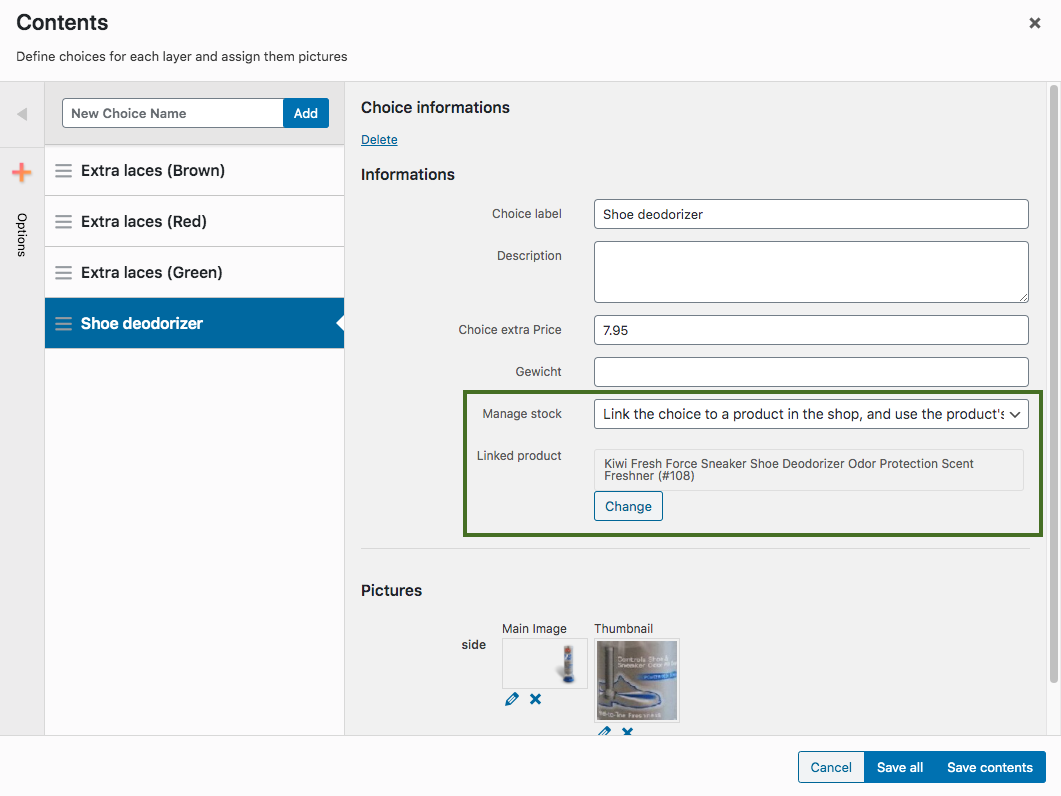
Track stock on a choice, or link that choice to a real WooCommerce product and SKU.
What you can do
- Manage stock for each choice from inside the configurator.
- Link a choice to a simple product or to a variation.
- When that choice is selected, the linked product can be added to the cart.
- Out-of-stock choices can be blocked before the customer orders them.



How it works
- Set a stock quantity on the choice, or link the choice to a WooCommerce product.
- The customer only configures what you can still sell.
- The order contains the configuration and, when you use it, the linked product line.
Use cases
- A component you already stock as its own SKU, sold inside a configured product.
- A finish that sells out on its own, independently of the main product.
- An order-management system that needs a real product line per chosen part.
Works with
FAQ
Does the linked product have to be a simple product?
No. You can link a simple product or a variation.
Is the linked product added to the cart?
It can be. That keeps the chosen part as its own line for stock and for order management.
Buy this feature alone
Only need Stock management / linked product? 1 site €49 · 5 sites €89 per 12 months (excl. VAT). Includes updates and support.
Need 3 or more add-ons? The bundle builder or Pro/Complete is cheaper.